The First-Hour BUILD · FNOL → drying plan · iPhone

From the first ring to a running drying clock. One hour.

The Intake Agent answers the FNOL call and drafts the Loss/Job before you've picked up your keys. By minute 64 the site is scoped, classified per IICRC S500, and drying — four approvals from you, zero documents typed.

▶ REAL APP · 85 s
64
minutes — FNOL ring to approved drying plan
4
human approvals · the judgments only you can make
0
documents typed — agents author, you review
9
agent actions, every one logged and reversible
Minute by minute

Agents do the paperwork. You make four calls.

Every screen below is the production UI — built Apple-native, running on iPhone. The grammar never changes: what the agent did is marked AUTO, what needs your judgment says Needs you, and nothing asks you to type a document.

01 7:38 AM · the phone rings

The FNOL call answers itself into a job.

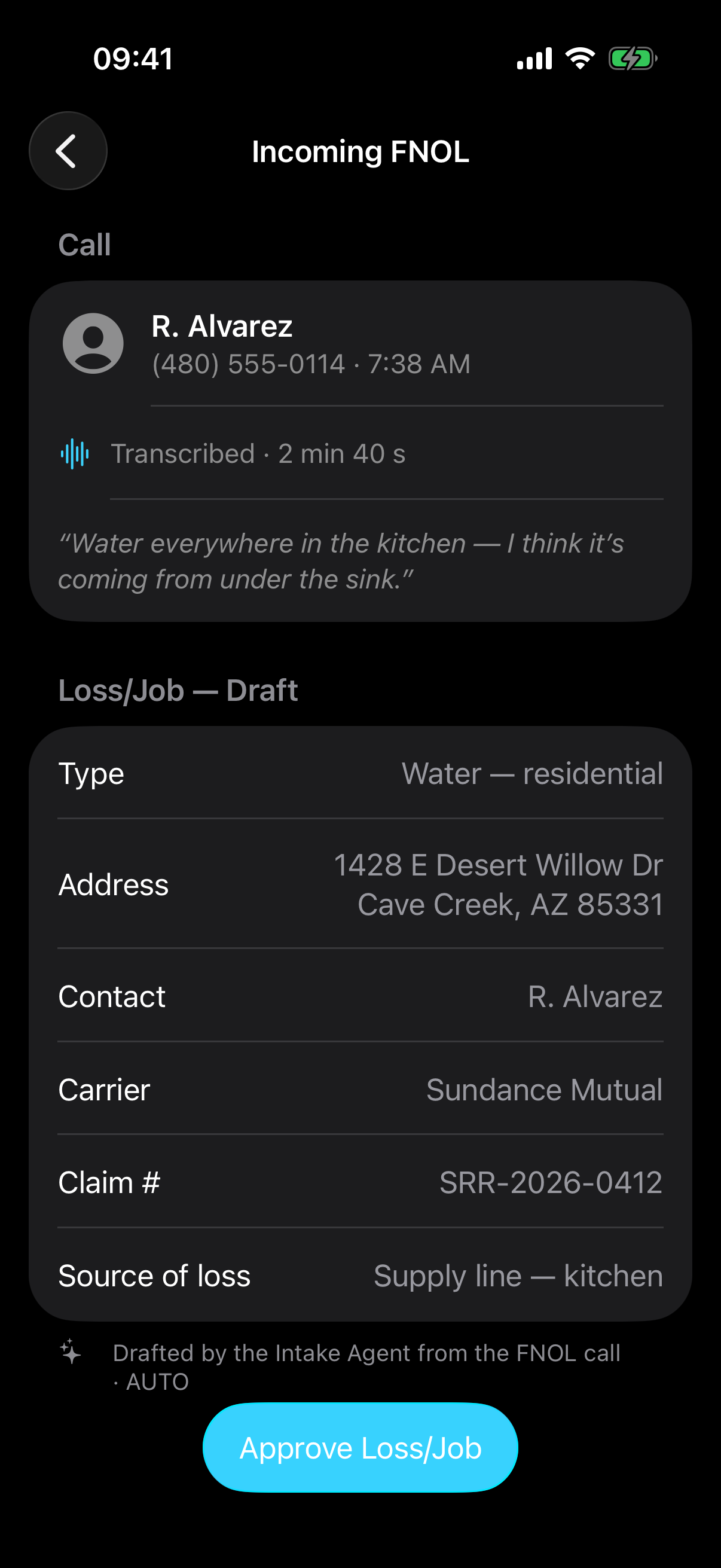
R. Alvarez calls about water in the kitchen. The Intake Agent transcribes the call live and drafts the Loss/Job — type, address, contact, carrier, claim number, source of loss — before the call ends. Your first approval is one tap, and it's the cash clock's first beat: the claim record starts at the ring.

🎙️
Call → draft, live. Every field extracted from the transcript — AUTO.
Approval 1 of 4. "Approve Loss/Job" — you confirm, you never re-key.
Incoming FNOL screen: the call from R. Alvarez transcribed — 'Water everywhere in the kitchen' — and below it the agent-drafted Loss/Job: water residential, 1428 E Desert Willow Dr Cave Creek AZ, Sundance Mutual, claim SRR-2026-0412, source supply line kitchen, with an Approve Loss/Job button.
02 7:41 AM · dispatch, cert-gated

The right crew, certifications checked first.

The Dispatch Agent proposes Marcus T. — the closest crew chief whose IICRC WRT · ASD certifications it has already verified — with a stocked truck and a 41-minute ETA. It shows its reasoning, not just its answer. Water loss carries a 24-hour SLA; the priority slot is already held.

🛡️
Cert-gated. No crew is proposed that the standard wouldn't accept on the stand.
Approval 2 of 4. "Dispatch Crew" — one tap and the truck rolls.
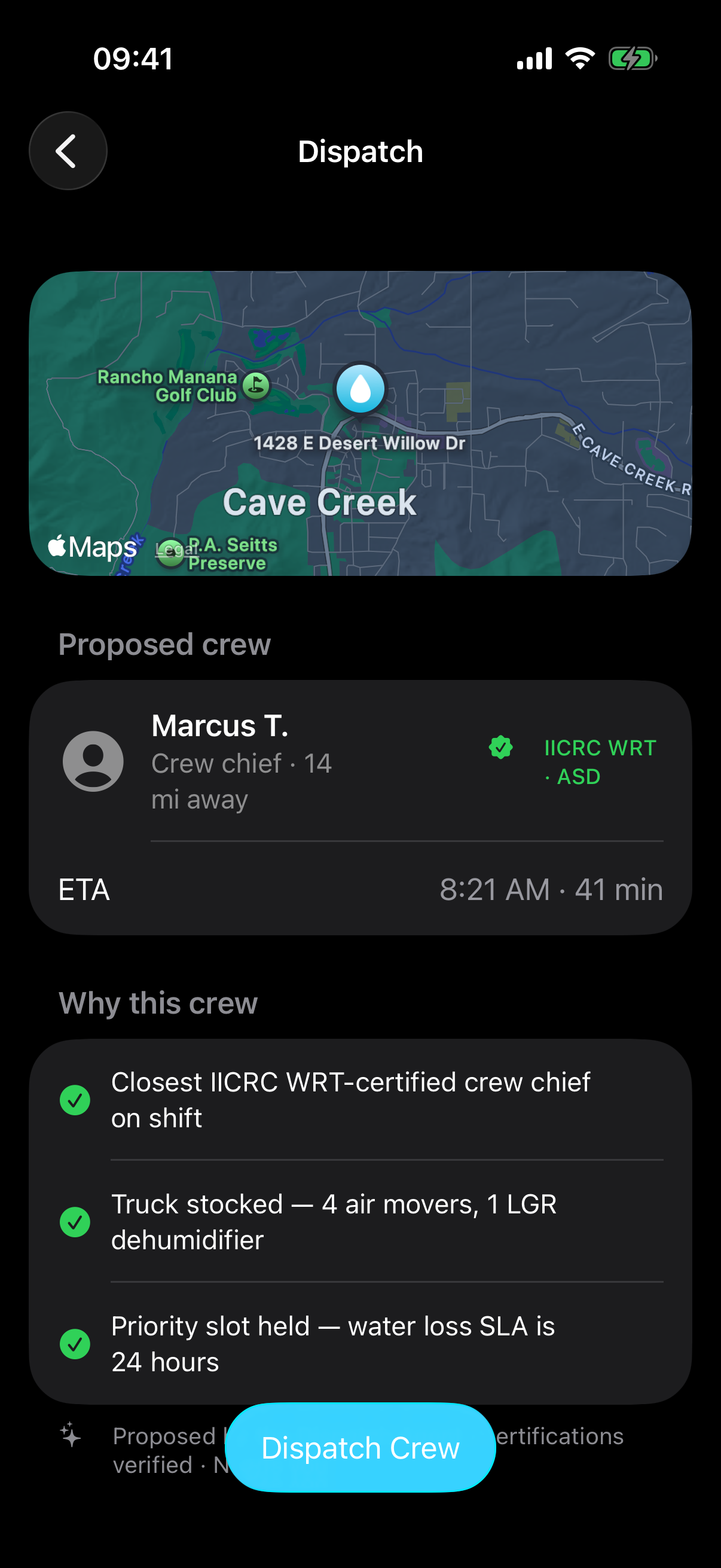
Dispatch screen: a map of Cave Creek with the loss pinned, proposed crew Marcus T. — crew chief, 14 miles away, IICRC WRT and ASD verified — ETA 8:21 AM, and the agent's reasoning: closest certified crew chief, truck stocked with 4 air movers and 1 LGR dehumidifier, priority slot held for the 24-hour water SLA.
03 7:42 AM · en route, auto-logged

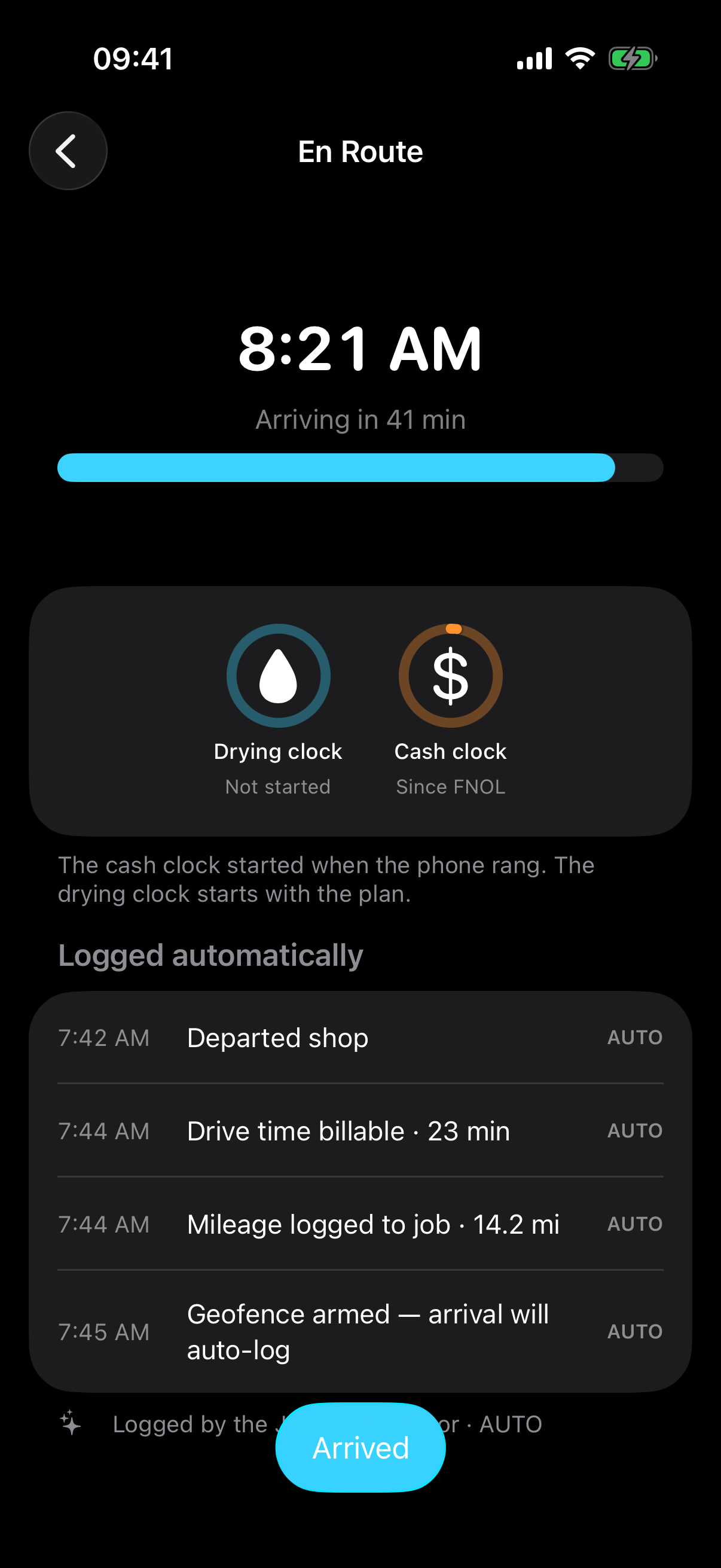
The drive logs itself — and the two clocks appear.

Departure, billable drive time, mileage to the job, geofence armed — every line lands by itself, marked AUTO. This is also where DRYLINE shows its worldview: two clocks govern every job. The cash clock has been running since the FNOL ring. The drying clock is waiting on your plan.

📍
No timesheet, no odometer photo. 14.2 billable miles captured to the job — AUTO.
Two clocks, one screen. Drying clock: not started. Cash clock: since FNOL.
En Route screen: arriving 8:21 AM with a progress gauge, the drying clock (not started) and cash clock (since FNOL) as circular gauges, and an auto-logged ledger — departed shop 7:42, drive time billable 23 min, mileage 14.2 mi, geofence armed — each marked AUTO.
04 8:21 AM · arrival · checklist pre-filled

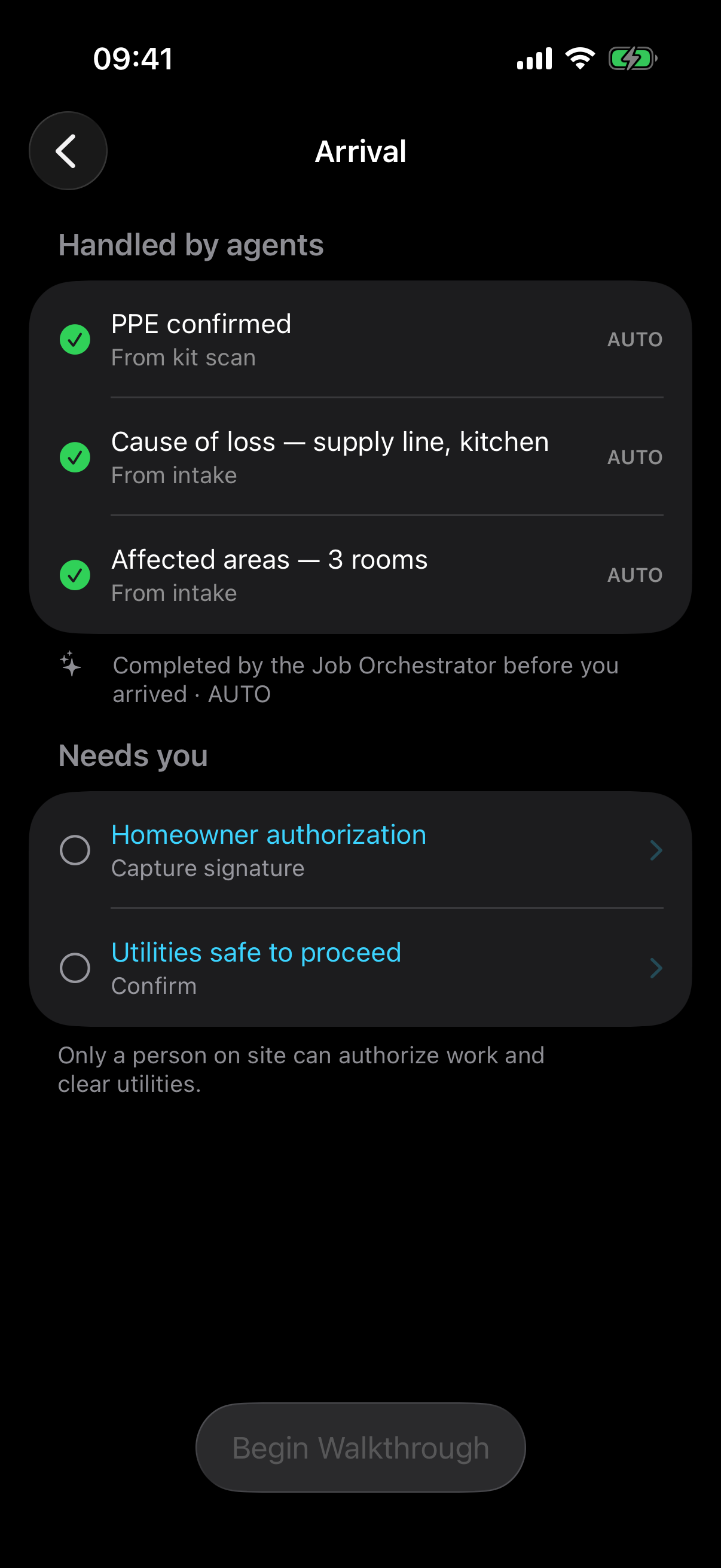
Five checklist items. Agents did three before you parked.

PPE from the kit scan, cause of loss and affected areas from the intake call — handled. What's left under Needs you is exactly what a sensor can't do: capture the homeowner's authorization signature and confirm utilities are safe. The authorization itself is agent-authored and read-only — the homeowner signs, you never draft.

3 of 5 pre-completed by the Job Orchestrator before arrival — AUTO.
✍️
The human gates. Signature and utilities-safe — judgment on site, nothing else.
Arrival screen with two sections: 'Handled by agents' — PPE confirmed from kit scan, cause of loss supply line kitchen, affected areas 3 rooms, each green-checked and AUTO — and 'Needs you' — homeowner authorization (capture signature) and utilities safe to proceed.
05 8:27 AM · walk the loss · photos classify themselves

Shoot the loss. Each frame files itself as evidence.

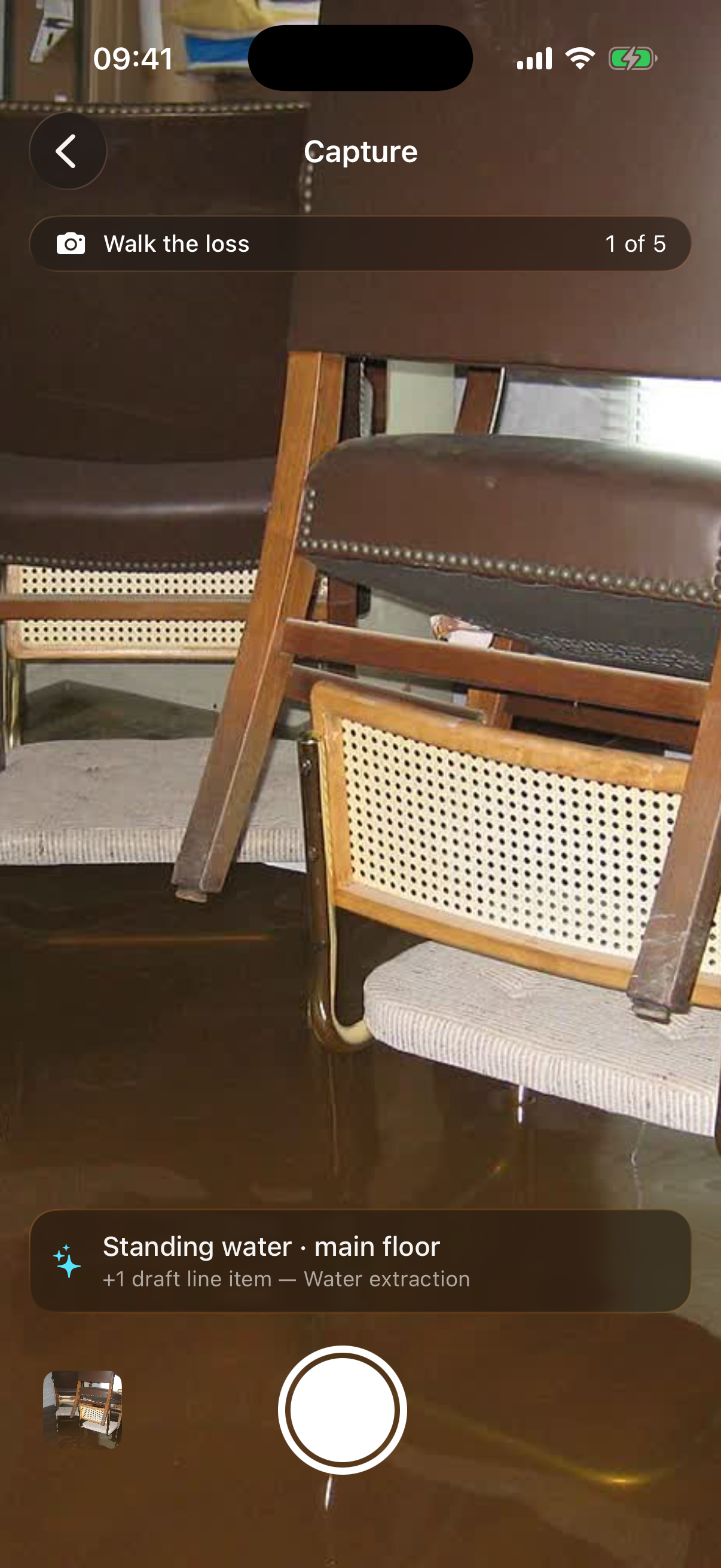
Every shutter press is classified on-device the instant it's taken — standing water, the supply-line source, delaminating drywall, saturated flooring — and where a photo justifies work, it drafts the scope line item on the spot. The evidence package the carrier will read is assembling itself while you're still in the room.

📸
Classified at capture. "Standing water · main floor · +1 draft line item — Water extraction."
🧾
Evidence-first. Every photo lands in the claim's evidence trail — no end-of-day upload.
The capture screen: a full-screen camera viewfinder on standing water, a 'Walk the loss · 1 of 5' bar at top, and a classification banner reading 'Standing water · main floor, +1 draft line item — Water extraction' above the shutter button.
06 8:34 AM · RoomPlan · the scope draws itself

One LiDAR sweep. Floor plan, affected area, three line items.

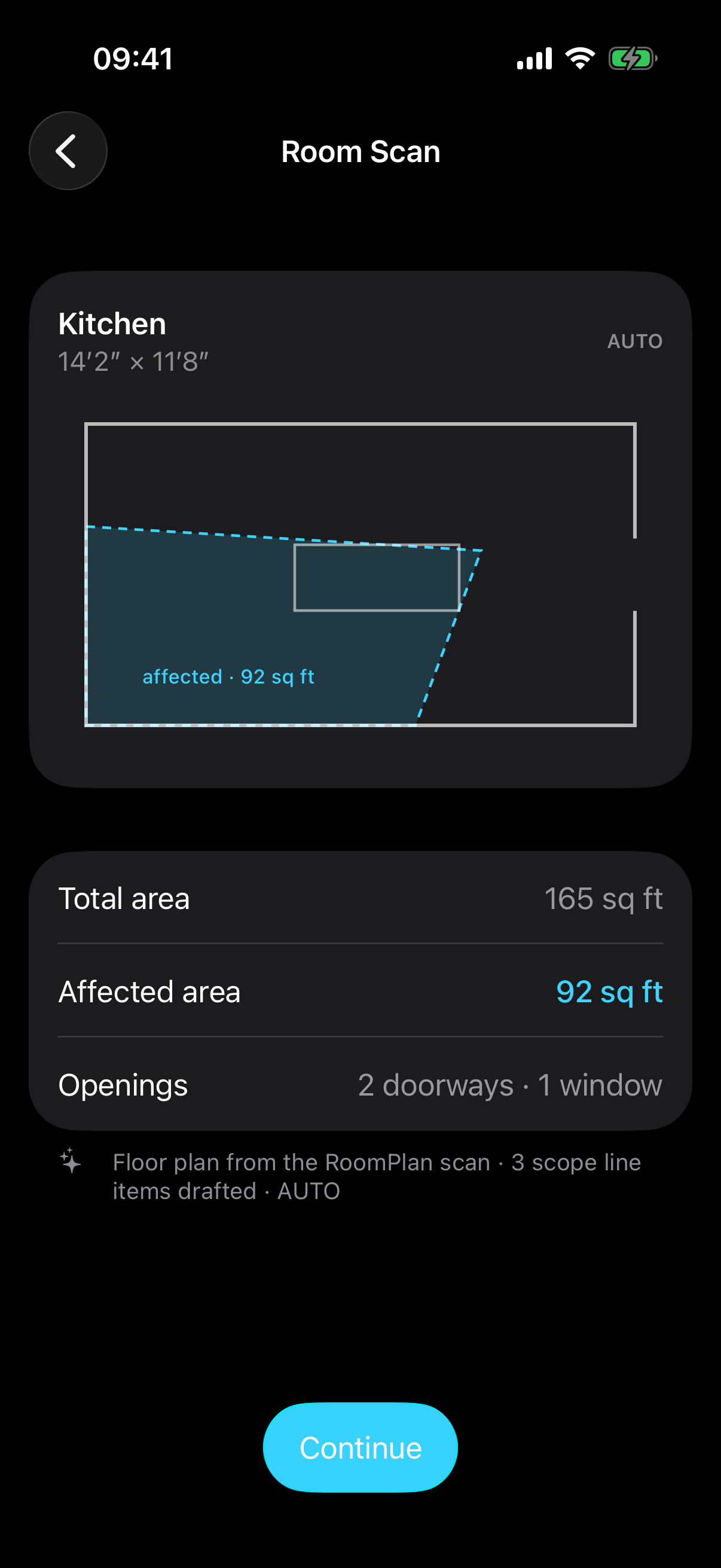
Walk the kitchen once and RoomPlan returns the floor plan with measured dimensions — 165 sq ft total, 92 affected — plus the doorways and the affected-area polygon. Three scope line items draft themselves from the geometry. No tape measure, no sketch, no re-keying at the office.

📐
Measured, not estimated. 14′2″ × 11′8″, wall openings included — AUTO.
📝
Geometry → scope. Extraction and treatment quantities come straight off the plan.
Room Scan result: a floor plan of the kitchen, 14 feet 2 by 11 feet 8, with the affected region outlined in dashed cyan and labeled 'affected · 92 sq ft', plus rows for total area 165 sq ft, affected area 92 sq ft, and openings — 2 doorways, 1 window — footnoted 'Floor plan from the RoomPlan scan · 3 scope line items drafted · AUTO'.
07 8:36 AM · voice walkthrough · speech → scope

Say what you see. It becomes structured scope.

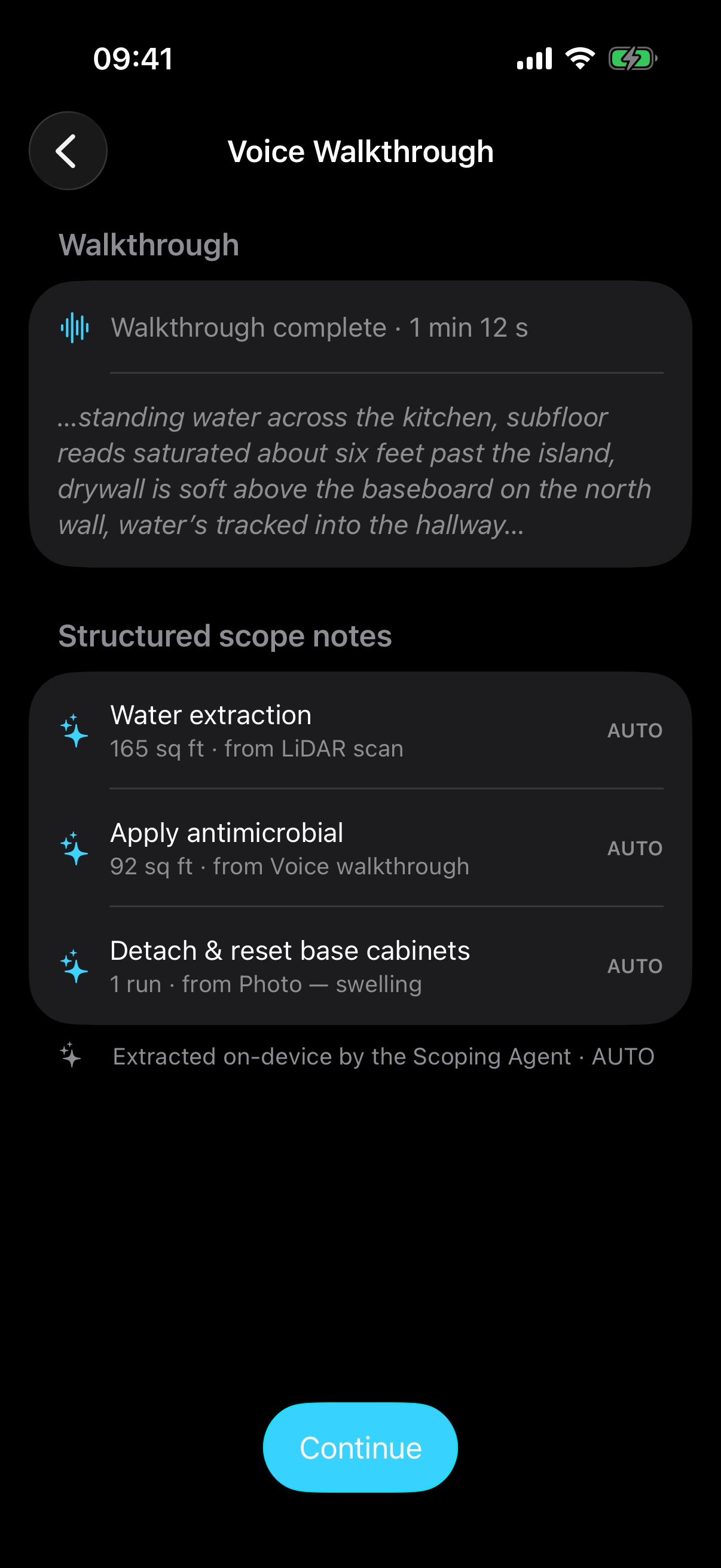
The crew chief narrates the walkthrough — saturated subfloor past the island, drywall soft above the baseboard — and on-device transcription hands it to the Scoping Agent, which turns speech into structured scope notes with quantities and evidence links. The best scoping tool on a loss is still a trained eye. Now it doesn't need a keyboard.

🗣️
On-device transcription. Works in a dripping crawlspace with no signal — offline-first.
🔗
Every note evidence-tagged. "92 sq ft · from Voice walkthrough" — traceable to its source.
Voice Walkthrough screen: 'Walkthrough complete · 1 min 12 s' with the italic live transcript, and below it structured scope notes — water extraction 165 sq ft from LiDAR scan, apply antimicrobial 92 sq ft from voice walkthrough, detach and reset base cabinets from photo — each marked AUTO.
08 8:39 AM · the judgment gate

Category 1 · Class 2 — proposed with its evidence attached.

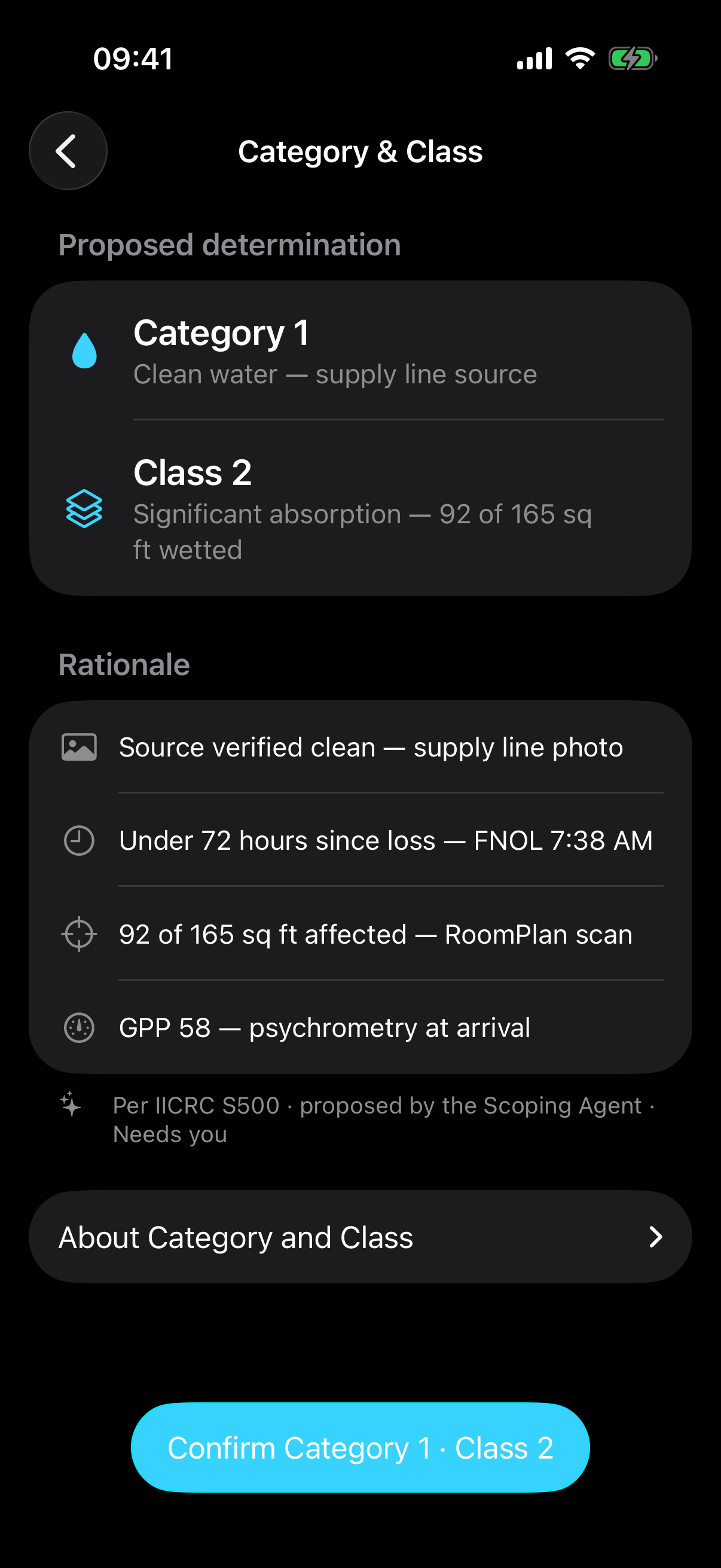
The determination that anchors everything — the drying plan, the equipment load, what the carrier will accept — arrives proposed, not decided. Category 1 because the supply-line source is verified clean in a photo. Class 2 because 92 of 165 sq ft is wetted per the scan. Every rationale row cites its source. You confirm it, per IICRC S500.

📄
Evidence-cited rationale. Photo, FNOL timestamp, scan, psychrometry — line by line.
Approval 3 of 4. "Confirm Category 1 · Class 2" — the call only a person makes.
Category & Class screen: proposed determination Category 1 — clean water, supply line source — and Class 2 — significant absorption, 92 of 165 sq ft wetted — with rationale rows citing the supply-line photo, under-72-hours FNOL timing, the RoomPlan scan, and GPP 58 psychrometry, footnoted 'Per IICRC S500 · proposed by the Scoping Agent · Needs you', and a Confirm Category 1 · Class 2 button.
09 8:42 AM · the drying plan · clock starts

Approve the plan — and the drying clock starts running.

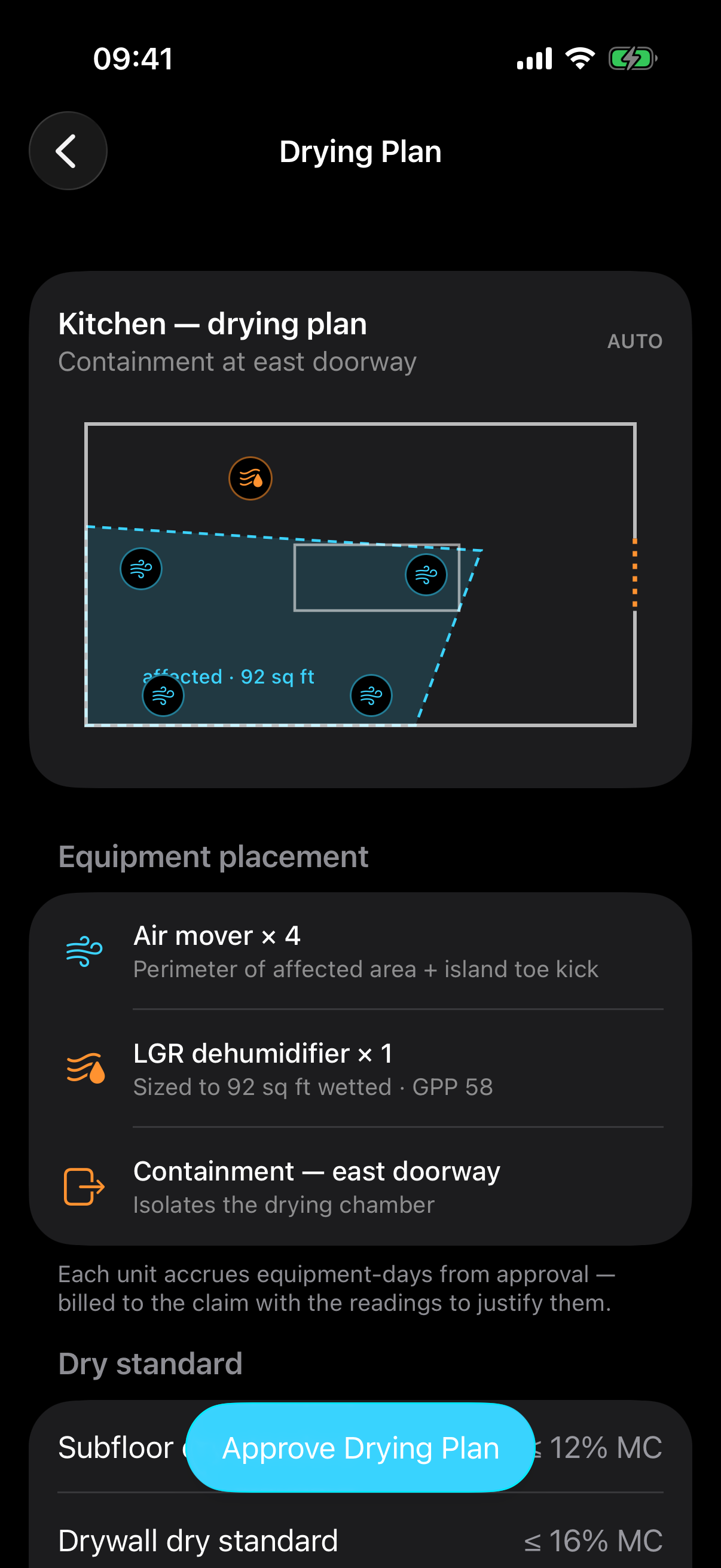
Four air movers on the wet perimeter, an LGR dehumidifier sized to the wetted area and the GPP, containment across the east doorway, and a dry standard per material — subfloor ≤ 12% MC, dry goal Thursday. Your fourth approval starts the drying clock, and every unit starts accruing equipment-days billed with the readings to justify them.

💨
Sized by psychrometry. Equipment set matched to 92 sq ft wetted at GPP 58 — per S500.
🧾
Approval 4 of 4 starts both meters. Drying clock runs; equipment-days accrue to the claim.
Drying Plan screen: the kitchen floor plan with four air-mover glyphs, a dehumidifier, and dashed containment across the east doorway; equipment placement rows for air mover ×4, LGR dehumidifier ×1, and containment; and dry-standard rows — subfloor ≤12% MC, drywall ≤16% MC, dry goal Thursday day 4 — with an Approve Drying Plan button.
Two clocks · one hour

The cash clock started at the ring. The drying clock started at your fourth tap.

Every feature in DRYLINE exists to shorten one of two clocks — the drying clock (physics: secondary damage starts in 24–48 hours) or the cash clock (the carrier pays in 30–90 days against a defensible file). The first hour is where both are won.

0minutes · ring → drying

Sixty-four minutes, and the byproduct is the point: every capture along the way — the transcript, the photos, the scan, the readings — is already filed in the carrier-defensible evidence package. Nothing gets written up later, because it was written the moment it happened.

7:38 AM — FNOL call · cash clock startsmin 0
7:41 AM — Loss/Job approved (tap 1)min 3
7:45 AM — crew dispatched, cert-gated (tap 2)min 7
8:21 AM — on site · checklist pre-filledmin 43
8:39 AM — Category 1 · Class 2 confirmed (tap 3)min 61
8:42 AM — drying plan approved (tap 4) · drying clock startsmin 64
8:42 AM · first hour complete

9 agent actions. 4 approvals. 0 documents typed.

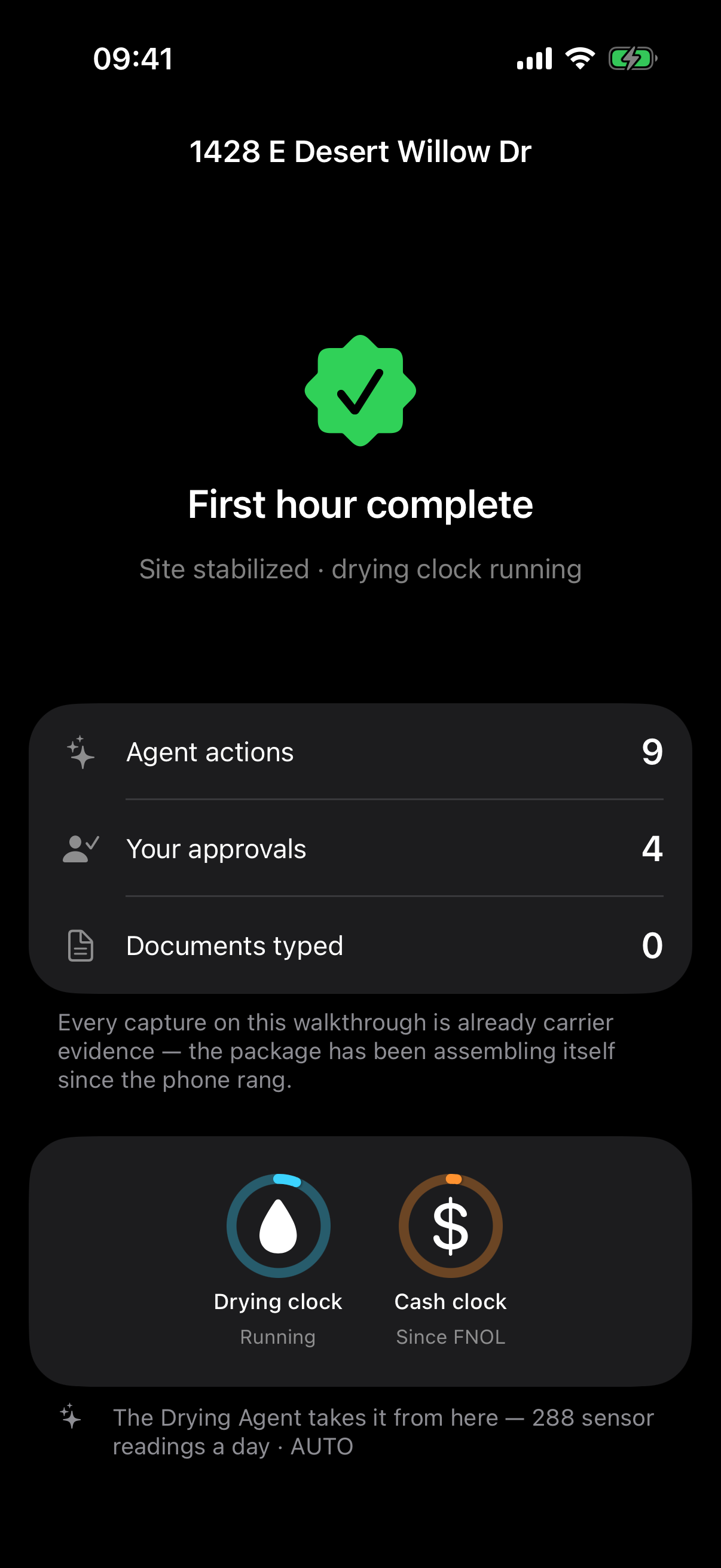
That's the scoreboard at minute 64 — and every agent action is logged, attributed, and reversible, because the same trail that runs the job defends the claim. From here the Drying Agent takes over: 288 sensor readings a day against the S500 curve, and nobody drives out unless something stalls.

🧾
The file built itself. Transcript, photos, scan, plan — filed as evidence at capture time.
📡
Hand-off to MONITOR. The sensor mesh holds the line — see the field app for days 2–7.
First hour complete screen: a green check seal, 'Site stabilized · drying clock running', stat rows — agent actions 9, your approvals 4, documents typed 0 — the two clocks with the drying clock now running, and a footnote that the Drying Agent takes it from here with 288 sensor readings a day.
Who did the work

Five agents worked this hour. You met none of them.

Each agent runs at a frozen autonomy tier: AUTO acts and logs, AUTO_PROPOSE drafts and waits for your tap. The irreversible gates — claim submission, demolition, final invoice — always stay HUMAN_REQUIRED.

AUTOIntake AgentAnswers the FNOL call, transcribes it, drafts the Loss/Job with carrier and claim attached.
AUTO_PROPOSEDispatch AgentProposes the closest IICRC-certified crew with ETA and reasoning; you tap to roll the truck.
AUTODocumentation AgentClassifies every photo at capture and files it into the carrier evidence package.
AUTO_PROPOSEScoping AgentTurns the scan and your voice into scope line items; proposes Category & Class per S500.
AUTO_PROPOSEDrying AgentSizes containment and equipment to the psychrometry; runs the drying clock from your approval.
◆ Agents author, act, and log. Humans approve and comment — never type the document.
For Salt River Restoration

The first hour used to be a clipboard. Now it's four taps.

One phone call became a scoped, classified, drying loss with a carrier-ready file — in 64 minutes. Then the mesh takes the next five days.