The field app · iPad & iPhone · offline-first

One tap to start. The job tells you the next thing.

DRYLINE in the field is Apple-native — RoomPlan scope, on-device capture, NFC-tracked equipment, a sensor mesh that dries the job for you. BUILD is human-heavy for two days. Then MONITOR runs itself.

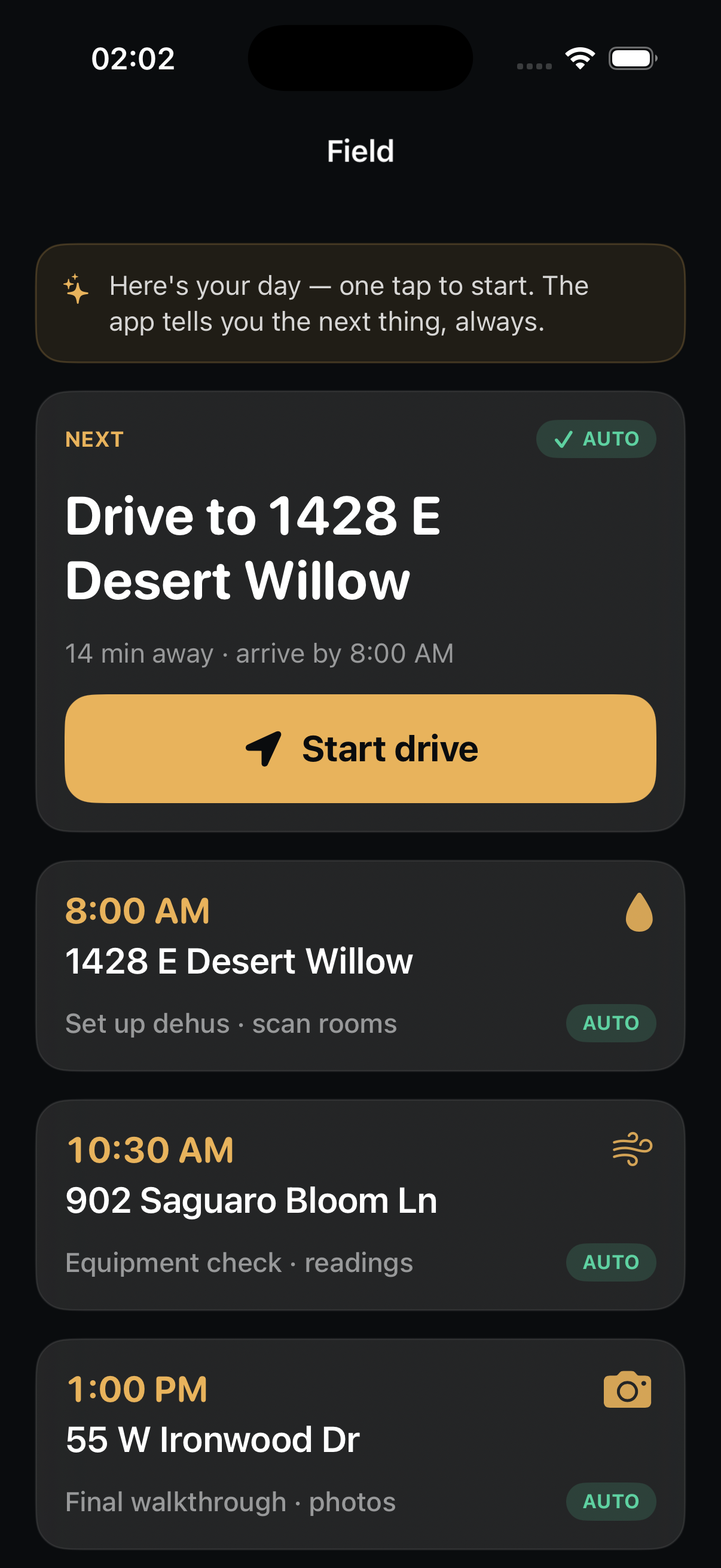
The DRYLINE field app showing the day's work queue: a Start-drive card to the first job, then a timed list of stops — set up dehus, equipment check, final walkthrough — each marked AUTO.
2
days of BUILD — then the crew drives away
12
sensors stream psychrometrics every ~5 min
0
timesheets, odometer photos, or manual asset scans
100%
offline-capable — captures locally, syncs when it can
Two phases per job

BUILD is hands-on. MONITOR is hands-off.

Every loss runs in two phases, and the field app changes shape between them — auto-switched by Apple Dynamic Profiles. Days 0–2 the crew is on site capturing the truth. Days 2–7 the sensor mesh holds the line and nobody needs to drive out.

Day 0–2 · human-heavy

BUILD

The crew arrives, scopes with RoomPlan, captures photos and readings, sets equipment, and gets the homeowner's signature. The app pre-fills everything it can — the human supplies the judgment a sensor can't.

RoomPlan scope Photo & voice capture Equipment set Authorization
Day 2–7 · sensor-heavy

MONITOR

The crew drives away. A LoRaWAN sensor mesh streams psychrometrics every few minutes, the drying agent builds the daily S500 log, and equipment moves are proposed automatically on a stall. Near-zero human.

Sensor mesh · live Daily S500 log Stall detection Auto-pilot
◆ The app flips itself — BUILD → MONITOR — when drying starts. The crew chief never toggles a mode.
A day in the field

The HANDS exception: a work queue, not an approval queue.

Every office role opens to a queue of proposals to judge and sign. The field is the one principled exception — the crew gets a work queue: the next thing to do, in order, each step the agent already handled the paperwork for. Same grammar, different verb.

01 En route · drive auto-logged

Departure to arrival, logged without a finger.

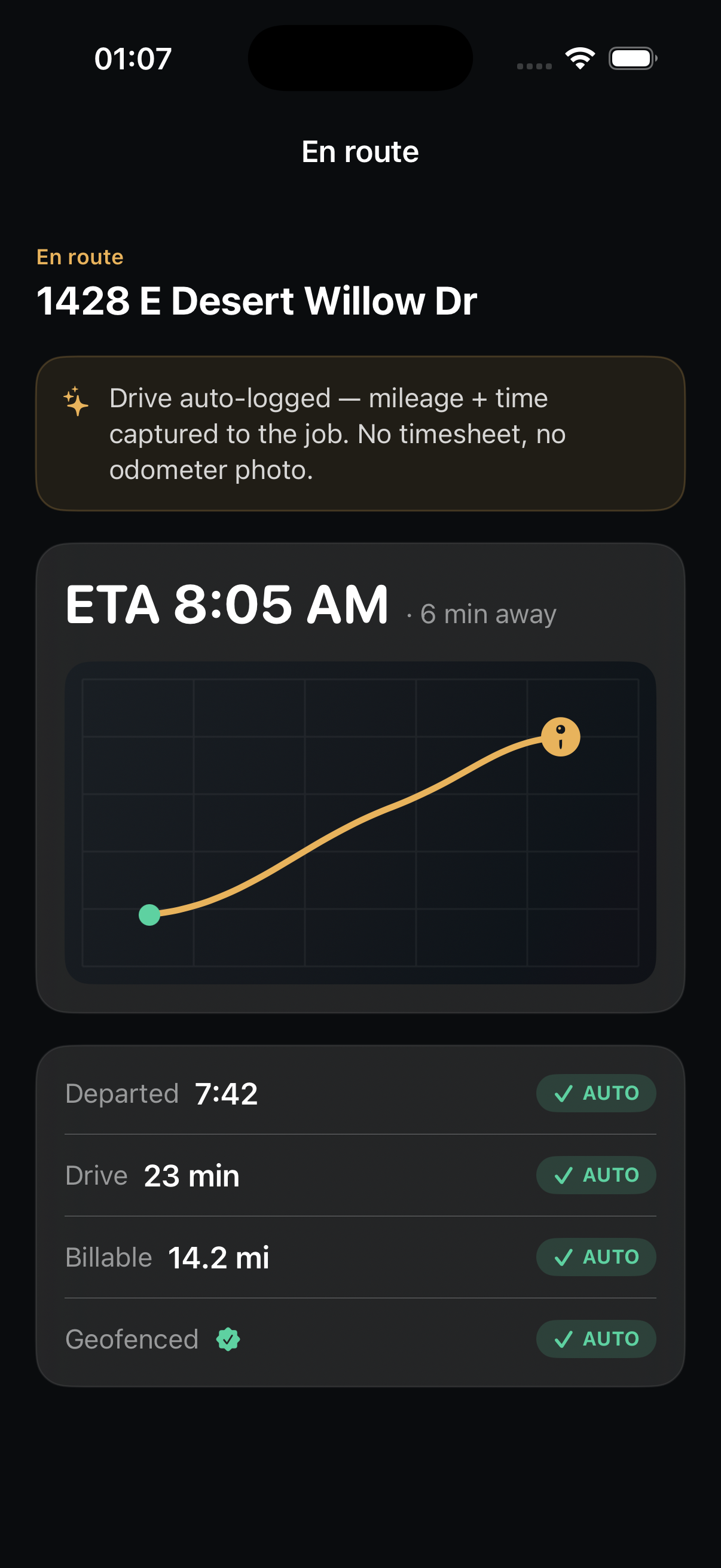
The crew taps Start drive and that's the last thing they do until they're standing in the loss. Mileage, time, and the geofence stamp capture themselves — no timesheet, no odometer photo. The billable trip is already on the job before the truck stops.
📍
Geofenced clock. On-site time starts the moment the truck crosses the property line.
🧾
Billable mileage. 14.2 mi captured to the job, tied to ESX — AUTO.
En route screen: ETA 8:05 AM, six minutes away, a route map, and an auto-logged ledger — departed 7:42, drive 23 min, billable 14.2 mi, geofenced — each marked AUTO.
02 Arrival · checklist pre-filled

You arrive to a checklist that already filled itself in.

Geofence detects arrival and the on-site clock runs. PPE, cause of loss, and affected areas are pre-confirmed from the intake call — the agent handled three of five items. The two left are the ones only a human can do: capture the homeowner's signature and confirm utilities are safe.
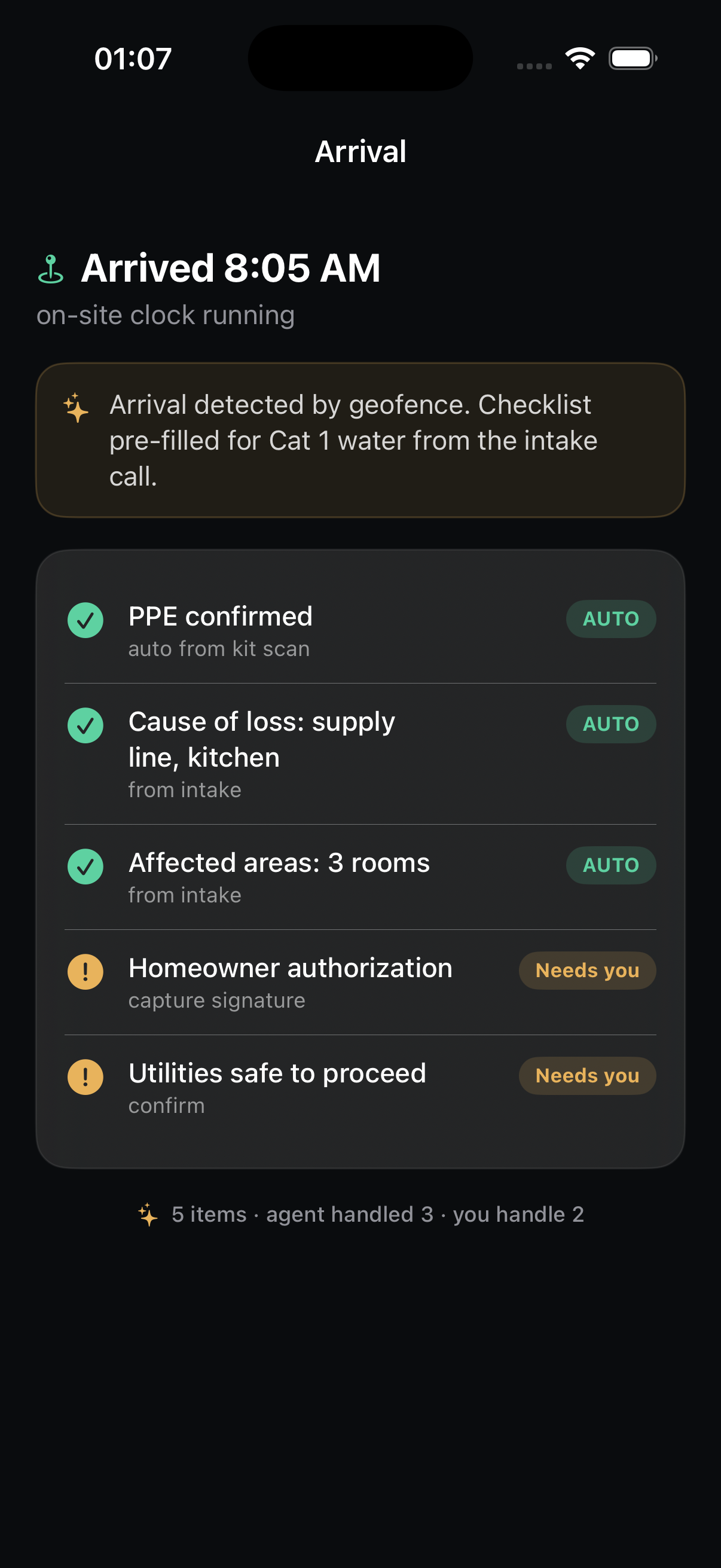
Agent handled 3. PPE from the kit scan, cause of loss and affected areas from intake.
You handle 2. Authorization signature and utilities-safe — the gates that need a person.
Arrival screen: arrived 8:05 AM, on-site clock running. Checklist pre-filled from the intake call — PPE confirmed, cause of loss, affected areas all AUTO — with homeowner authorization and utilities-safe flagged 'Needs you'.
03 RoomPlan · the scope scans itself

Walk the room once. The scope draws itself.

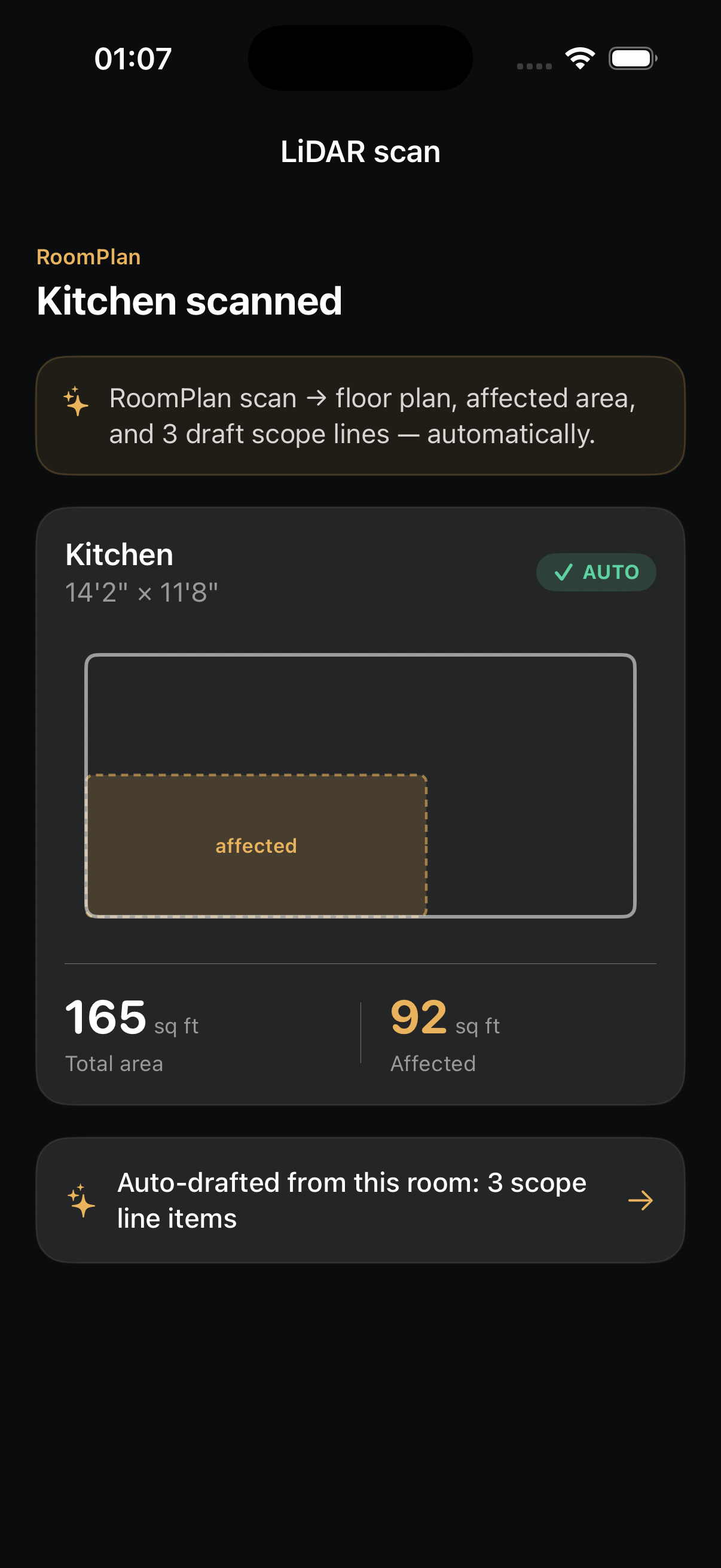
A single LiDAR sweep with Apple RoomPlan produces a floor plan, the affected-area outline, and dimensions — 165 sq ft total, 92 affected — and auto-drafts three scope line items from that one room. No tape measure, no sketch pad, no re-keying back at the office.
📐
RoomPlan LiDAR. Floor plan + affected-area polygon + measured dimensions in one pass.
📝
Auto-drafted scope. Three line items generated from the geometry — AUTO.
LiDAR scan result: 'Kitchen scanned' — a RoomPlan floor plan with the affected area shaded, 165 sq ft total area and 92 sq ft affected, marked AUTO, with a note that three scope line items were auto-drafted from the room.
04 Capture · photos classify themselves

Shoot the loss. It files the evidence for you.

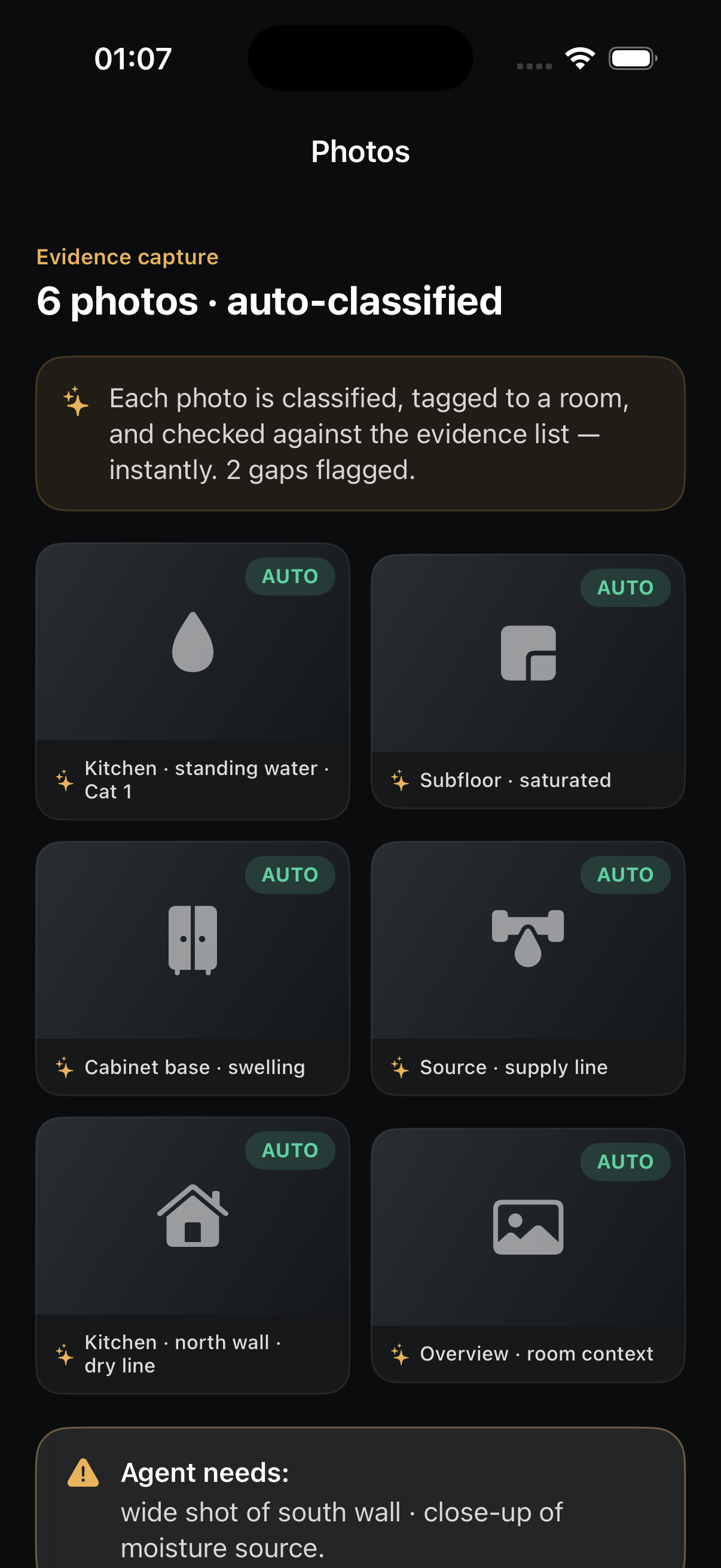
Every photo is classified on-device, tagged to a room, and checked against the carrier's evidence list the instant it's taken — standing water · Cat 1, saturated subfloor, swelling cabinet base. When a required shot is missing, the agent says so out loud, on the spot, before the crew leaves.
📸
Auto-classified. Six photos tagged to rooms and damage types, instantly — AUTO.
Gaps flagged live. "Agent needs: wide shot of south wall · close-up of moisture source."
Photos screen: six photos auto-classified and tagged to rooms and damage types — kitchen standing water Cat 1, subfloor saturated, cabinet base swelling, source supply line — each AUTO, with a warning that the agent still needs a wide shot and a moisture-source close-up.
05 Estimate · the scope assembles itself

The estimate builds as the inputs arrive.

Photos, the LiDAR scan, and moisture readings feed a scope that assembles itself in real time — water extraction tied to the LiDAR, antimicrobial to the photo evidence, air movers to the psychrometry. Each line is evidence-linked, so the carrier can see exactly why it's there. The crew never opens a spreadsheet.
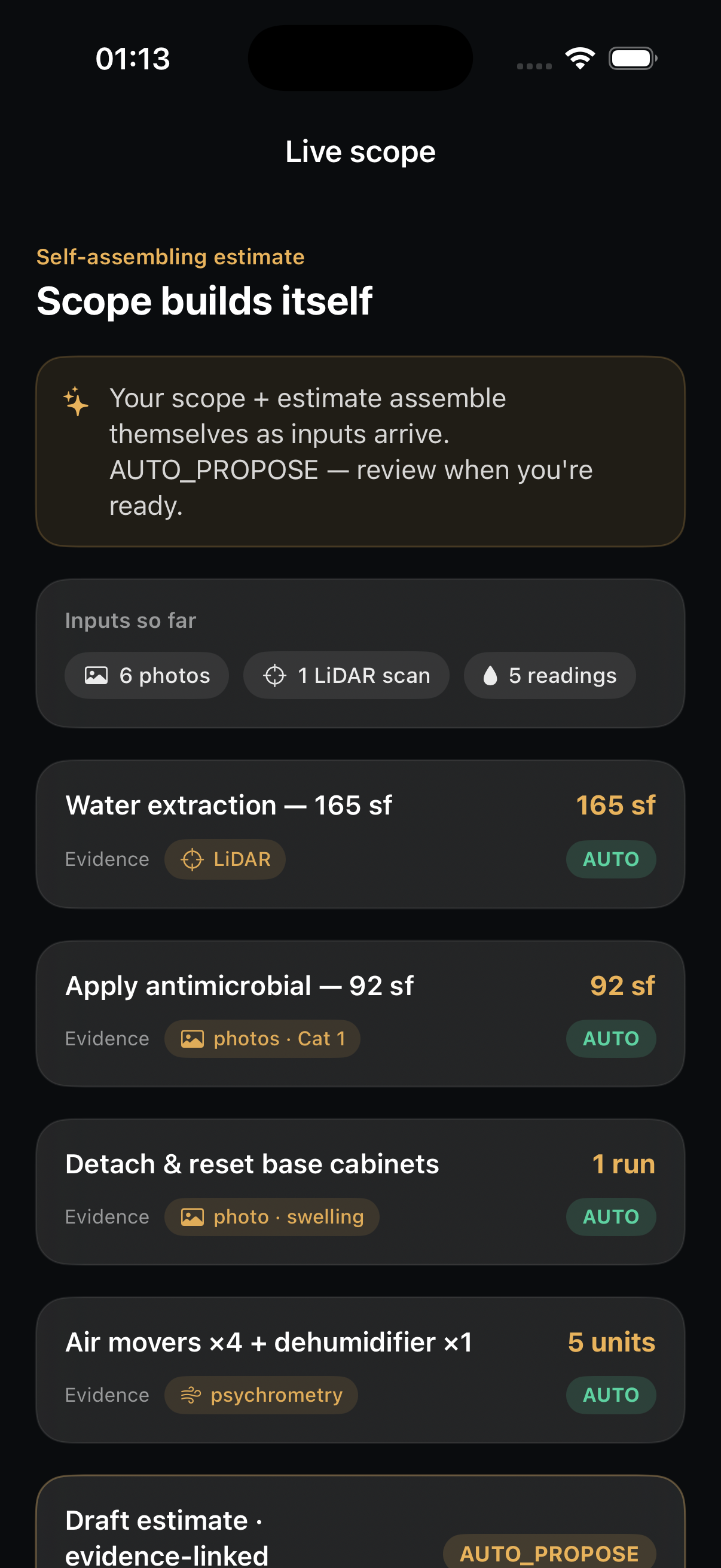
Evidence-linked lines. Every scope item points back to the photo, scan, or reading that justifies it.
AUTO_PROPOSE draft. The estimate is staged for review the moment the crew is ready — not days later.
Live scope screen: the estimate assembling itself from 6 photos, 1 LiDAR scan and 5 readings — water extraction 165 sf, apply antimicrobial 92 sf, detach and reset base cabinets, air movers and dehumidifier — each evidence-linked and AUTO, with a draft estimate marked AUTO_PROPOSE.
06 Equipment · the phone counts itself

Walk in, walk out. The gear logs itself.

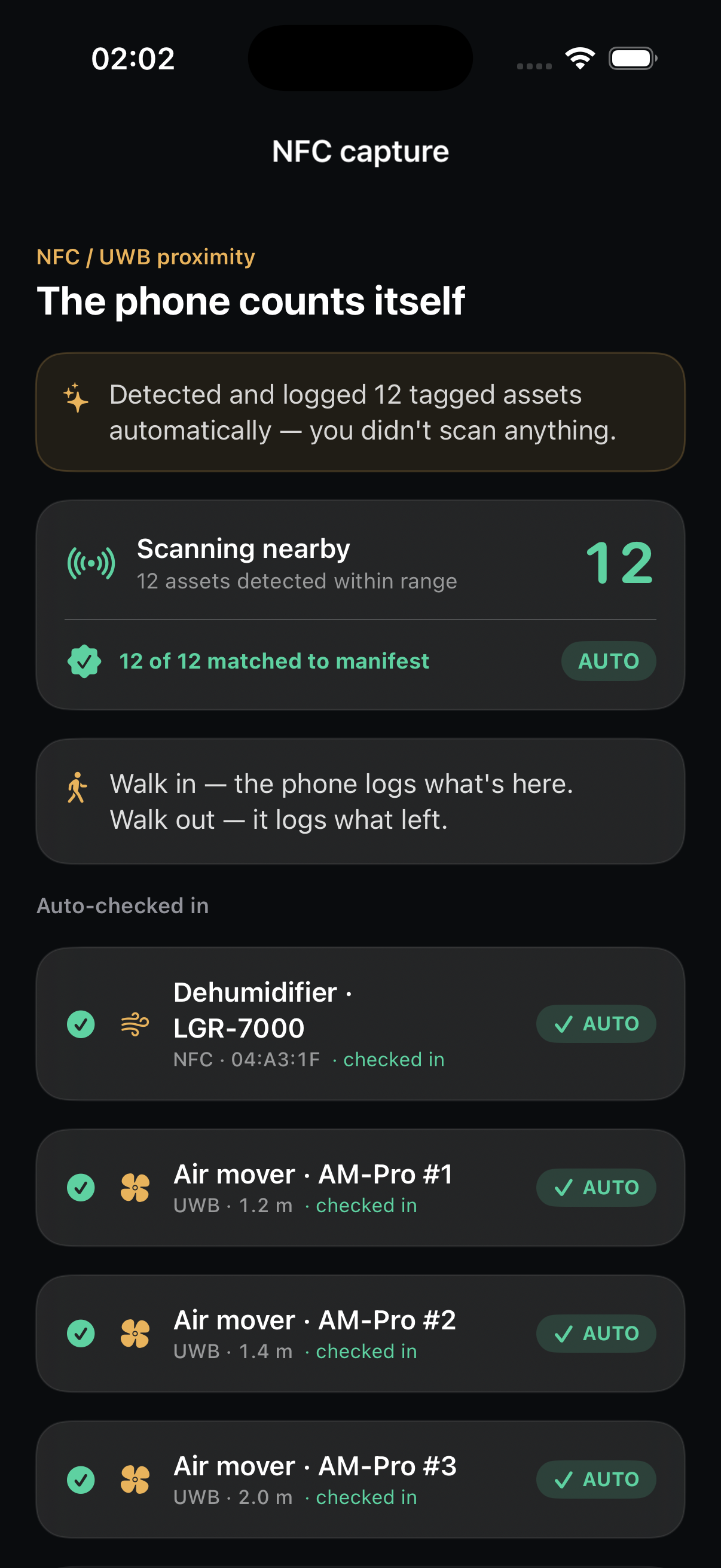
NFC and UWB proximity detect every tagged asset in range and match it against the manifest — 12 of 12, no scanning. Walk in, the phone logs what's here; walk out, it logs what left. The dehumidifier, the air movers, the scrubber — all checked in to the job automatically, all accruing billable equipment-days.
📡
NFC + UWB proximity. 12 assets detected and matched to the manifest with no manual scan — AUTO.
🧾
The fleet bills itself. Equipment-days accrue to ESX; idle units get flagged to pull.
NFC capture screen: scanning nearby detected 12 tagged assets within range, 12 of 12 matched to manifest, all AUTO. Below, a dehumidifier and three air movers auto-checked in by NFC and UWB proximity.
MONITOR · the drying clock

Then the crew drives away — and the mesh dries the job.

This is the moment DRYLINE earns its keep. Twelve sensors live on the job stream readings every ~5 minutes; nobody drives out. The drying agent tracks each material against its S500 dry standard, watches the trend, and only calls a human when something stalls.

0%to dry standard

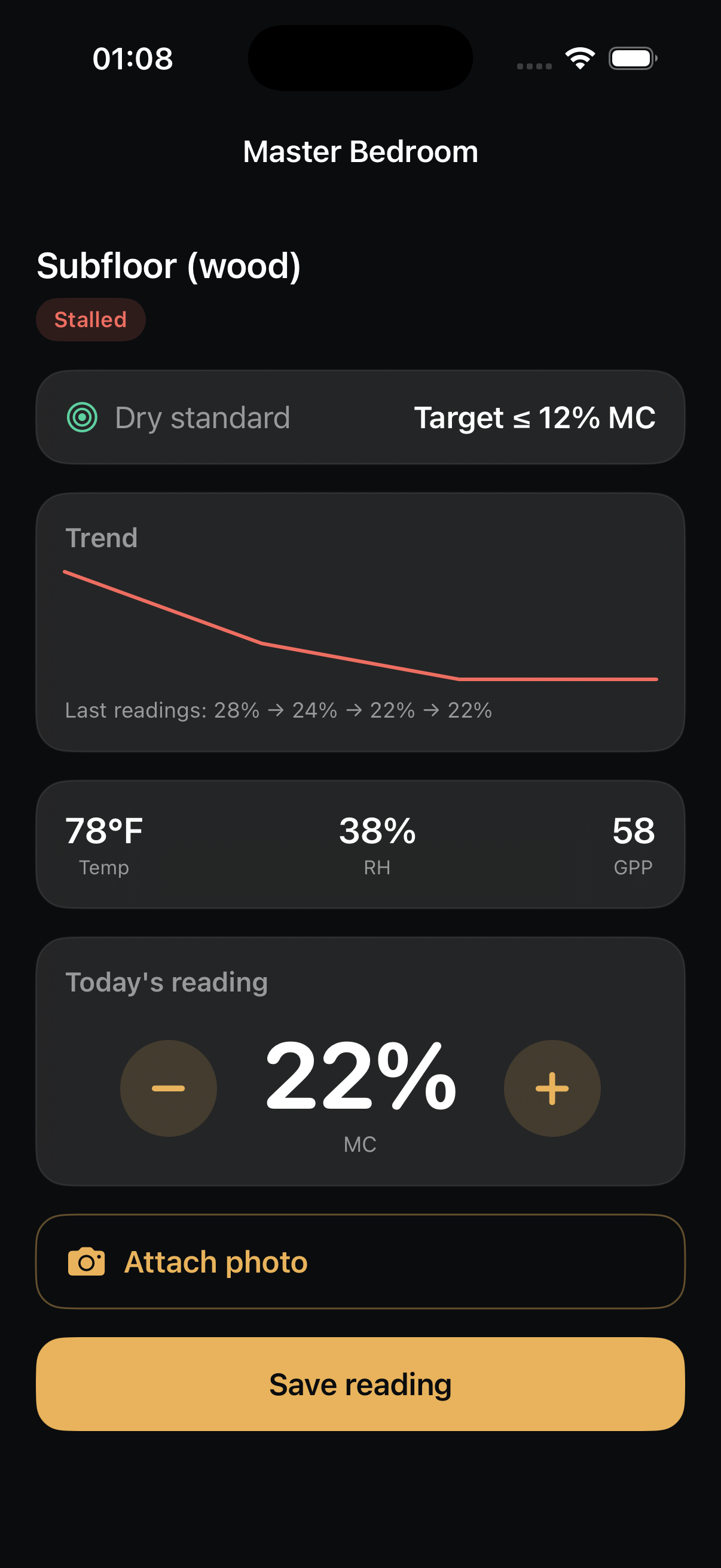
Master bedroom subfloor reads 22% MC against a ≤12% target, and the agent has flagged it Stalled — the trend flattened. That single judgment call is the one thing it sends back to a person: add airflow here, or accept the curve?

Sensors live on this job12
Reading cadenceevery ~5 min
Master bedroom subfloor22% MC · stalled
Hallway drywall base17% · on curve
Human visits required0 unless off-target
07 Auto monitor · sensor-fed

One screen holds the whole house drying in real time.

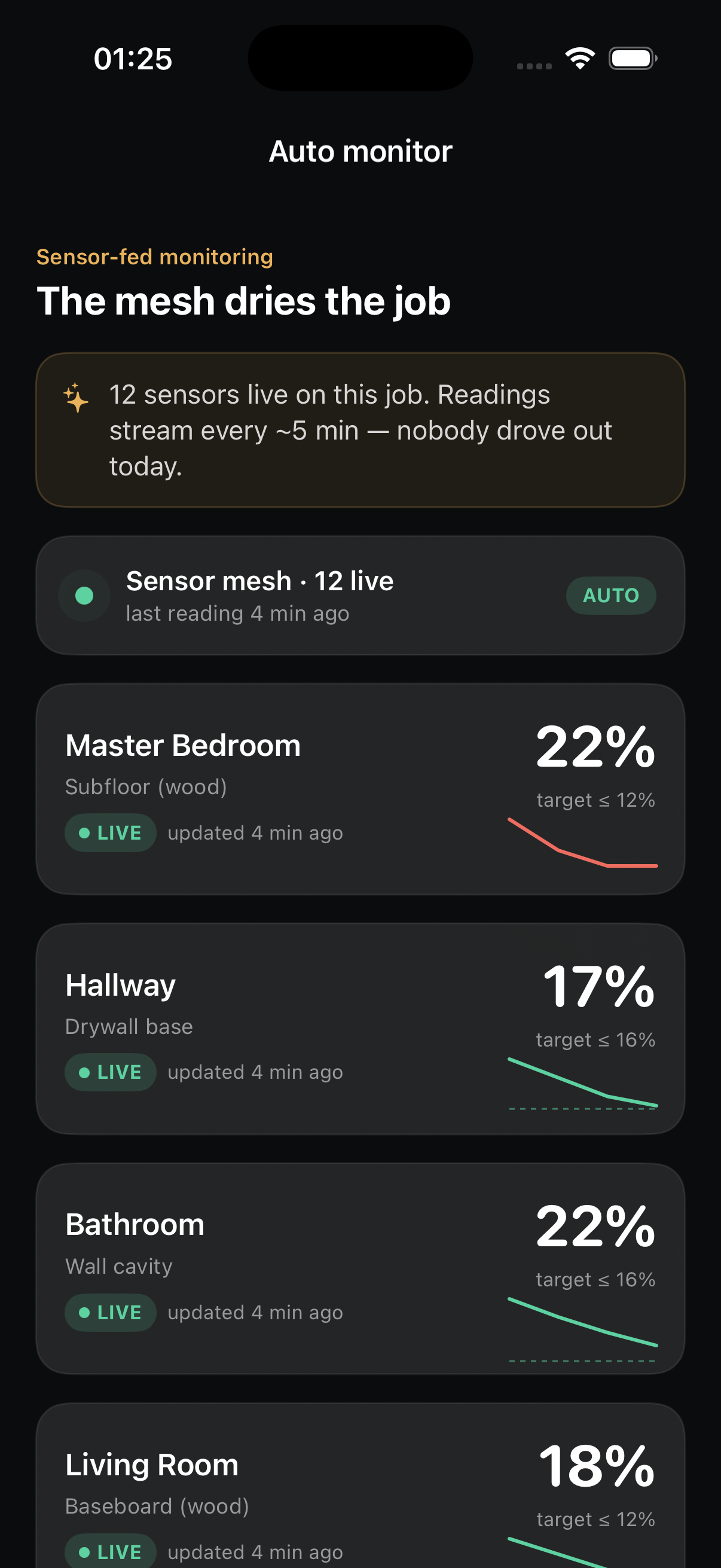
Every affected material is a live row — master bedroom subfloor, hallway, bathroom, living room — each with its own trend curve against its own target. Green is on the curve; the one that flattens turns rose and surfaces. The crew checks a glance, not a clipboard.

📈
Per-material trend. Each row carries its readings, its target, and the slope toward dry.
Stall = the only escalation. A flat curve is the one thing that pulls a human back in.
Auto monitor screen: 'The mesh dries the job' — 12 sensors live, readings every ~5 min. Master bedroom subfloor 22% (target ≤12%), hallway 17%, bathroom 22%, living room 18% — each a live row with a trend curve, all AUTO.
08 S500 reading · evidence-grade

Every reading lands in the carrier's evidence trail.

Open a material and you get the full psychrometric picture — temp, RH, GPP, and the moisture-content trend over the last readings, all measured to the S500 dry standard. Whether the mesh streams it or a tech taps it in, it lands in the same lossless, daily log the adjuster will read. The documentation builds itself.

🌡️
Full psychrometrics. Temp · RH · GPP · wood MC, every reading tied to room and time.
📄
Daily S500 log. The insurer's evidence trail assembles itself — no end-of-day paperwork.
Master bedroom subfloor reading: dry standard target ≤12% MC, marked Stalled, with a moisture trend 28% → 24% → 22% → 22%, current temp 78°F, RH 38%, GPP 58, and today's reading at 22% MC ready to save.
Same app, same shape

What the field captures, the cockpit signs.

Everything the crew captures in these screens flows straight to the office cockpits — the Crew Chief's work queue, the Project Manager's and Estimator's approval queues. The field does the hands; the office does the judgment. One app, one grammar, end to end.

For Salt River Restoration

Two days of hands. Five days of sensors. One field app for both.

The crew arrives, scopes, and sets the equipment — then drives away and lets the mesh dry the job. The agent did the paperwork; the human did the work only a human can.